AUDIO PLUGINS

Mixing
essentials.
Serious control.

Shape tone, control dynamics, and clean up tracks. A versatile suite with precise processing, familiar controls, and multi-instance editing in EQ, Comp, and Limit.

Free to use. Donations appreciated.

macOS UniversalAU + VST3
Shape tone with dynamic EQ and per-band audition.

Silent recording of SW EQ. A changing frequency spectrum moves beneath a fixed EQ curve with a low-frequency cut and several bands.

MULTI-INSTANCE EDITING

Move between tracks.
Stay in the
same window.

Open Instances in SW EQ, Comp, or Limit to select and edit another instance of that same plugin. Keep working across tracks without hunting through the mixer.

Available inEQCompLimit

Silent recording of SW EQ switching from Vocal to Bass and then Piano in the Instances list. EQ bands are adjusted in the same editor as the selected instance changes.

A CLOSER LISTEN

Hear what
you're changing.

Listen to what your processing is doing. On EQ, hear one band's contribution. On the dynamics tools, hear the difference between the original and processed signal.
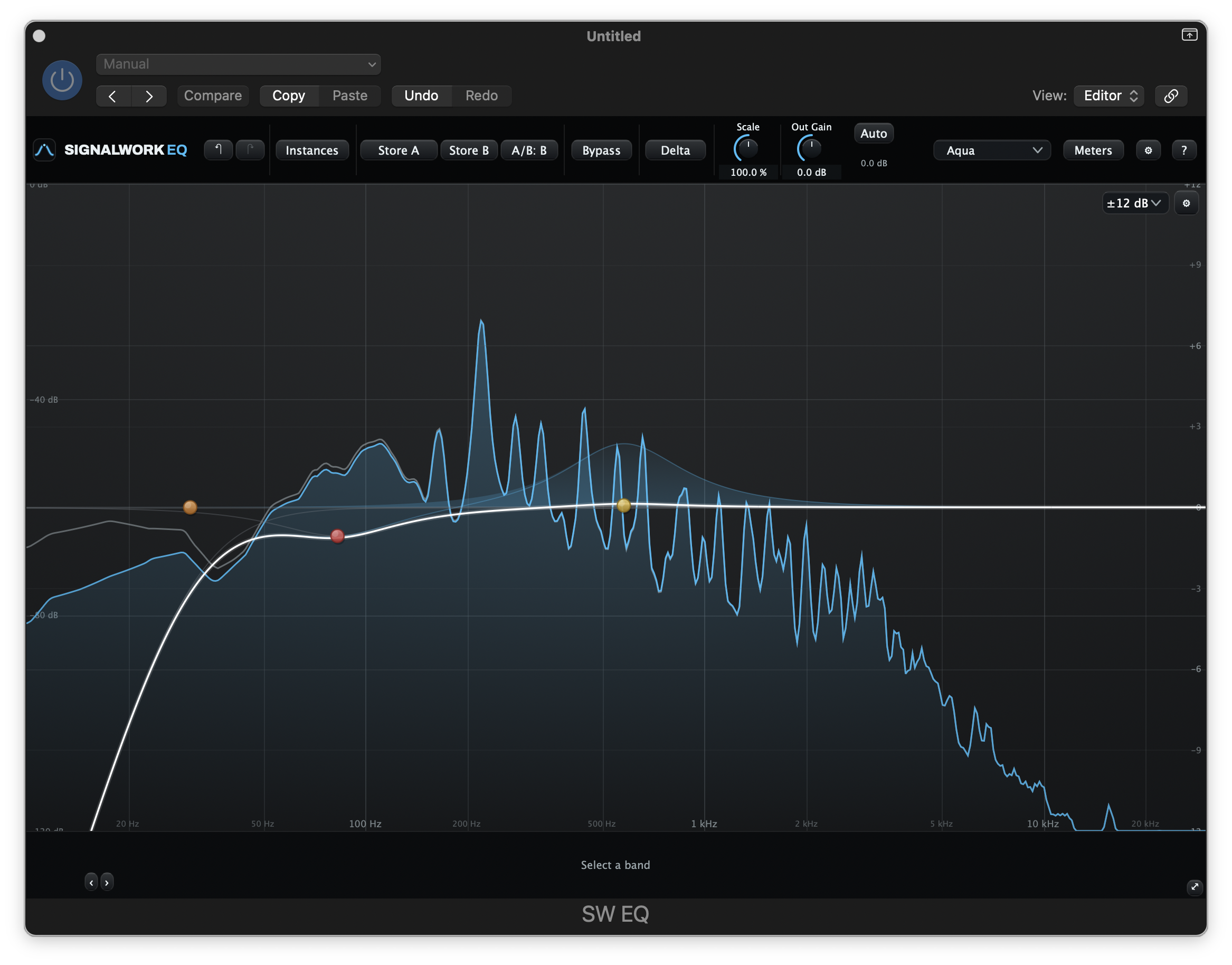
Right-click and hold to audition.
SW EQ plugin interface by Signalwork Audio
One band. Just its contribution.

CARE IN THE AUDIO PATH

The details
behind the sound.

Good utility plugins need more than a useful feature list. At Signalwork Audio, development includes checks on what happens to the audio as it passes through the processor.

01 / PRECISION

Double-precision EQ

SW EQ uses double-precision filter coefficients and state to keep rounding error low through the filters.

02 / CONTROL

Color is a choice

SW Comp's saturation stage is fully bypassed at zero. Comp and Limit offer optional 2x and 4x HQ processing to help manage aliasing.

03 / VALIDATION

Checks on the audio itself

Internal development tests include EQ response sweeps, compressor gain-curve checks, and limiter distortion and null tests.

A NOTE FROM THE MAKER

The tools I wanted.
Together in one suite.

Signalwork Audio grew out of the tools I reach for in my own sessions. I wanted the features and workflows I value across the commercial plugins I own and use, brought together in a consistent suite.

01SW EQ

Silent recording of SW EQ. A changing frequency spectrum moves beneath a fixed EQ curve with a low-frequency cut and several bands.

PARAMETRIC + DYNAMIC EQ

01SW EQ

Shape the tone.
Hear every move.

Make broad tonal changes or work on a single resonance. Then listen to exactly what each band contributes, with true per-band delta audition.

  • Up to 24 bandsBell, shelves, filters, notch, band-pass, and tilt.
  • Dynamic EQ per bandLet a band respond when the signal needs it.
  • Multi-instance editingSelect and adjust other EQ instances from this window.
  • Auto-gainCompare tone with less loudness bias.

02SW Comp

Silent recording of SW Comp. Input and output histories scroll across the display while the gain-reduction trace and meters respond during playback.

TRACK COMPRESSION

02SW Comp

Keep levels in hand.
Add a little color.

Set the movement and feel of a track with clear level history and gain-reduction feedback. Add saturation when you want some character.

  • Multi-instance editingMove between your Comp instances in the same editor.
  • Clean, Punch, SmoothThree starting points. Your controls stay live.
  • Optional colorBlend in saturation, or leave it fully off.
  • See the dynamicsFollow input, output, and gain reduction together.

03SW De-Ess

Silent recording of SW De-Ess with Full Band detection and Split processing selected. The waveform and level meters respond during playback.

VOCAL SIBILANCE CONTROL

03SW De-Ess

Tame the esses.
Keep the brightness.

Voice mode is designed to tell a sharp “s” or “sh” from a bright vowel, so you can deal with sibilance without reacting to every bright sound.

  • Voice detectionLooks at more than high-frequency level.
  • Split or WideReduce the sibilant band or the whole signal.
  • Audition as you adjustHear what the detector is catching.

04SW Gate

Silent recording of SW Gate. A transfer curve shows the expansion settings while the level history and input and output meters respond during playback.

GATING + EXPANSION

04SW Gate

Less spill.
More of the take.

Reduce quiet noise and spill between the phrases or hits you want to keep. Choose a firm gate or gentler expansion, then set how it opens and closes.

  • Gate or expandSet the amount of separation the track needs.
  • Focused detectionUse sidechain filters to trigger on what matters.
  • Shape the timingDial in attack, hold, release, and lookahead.

05SW Limit

Silent recording of SW Limit in Transparent mode. Input, output, and gain-reduction meters move as the signal reaches the limiter.

PER-TRACK PEAK CONTROL

05SW Limit

Catch the peaks.
Keep the track in check.

Take care of stray peaks before a track reaches your bus processing. A straightforward peak catcher for individual tracks.

  • A firm sample ceilingSet the output ceiling and control the peaks.
  • Multi-instance editingSelect and adjust other Limit instances in one editor.
  • Adaptive releaseRecovery adjusts to the signal.
  • Linked controlsMove threshold and output together when useful.

YOUR NEXT SESSION

Put the suite
to work.

The mixing essentials, together in one suite.
Download them and try them in your own session.

Free to use. Donations appreciated.

Get the free suite

macOS · AU + VST3 · Apple silicon + Intel

Suite 1.0.2 · 77.4 MBSigned installer. Notarized by Apple.
Changelog

Suite 1.0.2

Updated the publisher name to Signalwork Audio.

Included versions

SW EQ
2.9.2
SW Comp
1.1.1
SW De-Ess
1.1.1
SW Gate
0.3.1
SW Limit
1.0.1

Installer notes

  • Some installer screens still show version 1.0.1 and old notarization wording. The included plugins are current, and the installer is signed and notarized by Apple.
File verification

SHA-256 checksum for the installer:

966fd53834826e84b186d3d8678d94d7a7958b16072cca3c047a3e16519f5dea

Suite 1.0.1

AU and VST3 plugins for Apple silicon and Intel Macs. Choose which plugins and formats to install.

Included versions

SW EQ
2.9.1
SW Comp
1.1.0
SW De-Ess
1.1.0
SW Gate
0.3.0
SW Limit
1.0.0

Installer notes

  • The installer is signed, notarized by Apple, and stapled.
  • The installer closing screen has an outdated sentence saying notarization is pending. This release is already notarized.
File verification

SHA-256 checksum for the installer:

c49a78771a4a70d1612714f128c4ce1762ba8df9f6259d10a24ef7667b2d44d8
Installation help
  1. Quit your DAW, then open the downloaded installer.
  2. Use Customize to choose your plugins and formats. Installation requires your Mac administrator password.
  3. Reopen your DAW and look for SW EQ, SW Comp, SW De-Ess, SW Gate, and SW Limit in its plugin list.
Need a hand? Contact support

INDEPENDENTLY MADE

Help keep
the suite growing.

If these tools earn a place in your sessions, a donation helps fund updates and future plugins.

The whole suite is free to use, whether you donate or not.

Support Signalwork Audio

Need a hand with a plugin?

signalworkaudio@gmail.com

Include your DAW, macOS version, plugin name and version, and what happened.